GoHighLevel Review: Honest Verdict After Extended Testing
14 min read · Updated May 2026
Yes. GoHighLevel earns a 4.5/5 after extended testing. It excels at consolidating marketing tools for agencies - CRM, email, SMS, funnels, scheduling, and automation in one platform. The $297 Unlimited plan offers exceptional value for agencies managing multiple clients. Main weaknesses: steep learning curve (budget 2-4 weeks), email deliverability requires manual DNS setup, and individual features don't match dedicated best-in-class tools.
TL;DR
- 4.5/5 overall - best all-in-one platform for agencies, strong automation, excellent white-labelling
- Main strengths - tool consolidation, unlimited sub-accounts, powerful workflows, SaaS mode
- Main weaknesses - steep learning curve, email deliverability needs configuration, reporting could be deeper
- Best for - marketing agencies managing 3+ clients, service businesses running multiple channels
- Not for - solopreneurs who need one tool, e-commerce, enterprise with complex CRM reporting needs
EXTENDED FREE TRIAL
Start with 30 days free, not 14.
Use our partner link to get double the standard 14-day trial.
Start Your Free 30-Day Trial →Overall Verdict
After using GoHighLevel extensively, the verdict is clear: it is the best all-in-one marketing platform for agencies. No other platform offers the same breadth of features at this price point with white-labelling included.
That said, it is not perfect. The learning curve is real, the interface can feel overwhelming at first, and some individual features do not match dedicated tools. But the value of having everything in one place - with native data flow and one subscription to manage - outweighs the trade-offs for most agencies.
👍 GoHighLevel Pros
- ✓Replaces 10+ separate tools with one subscription
- ✓Unlimited sub-accounts on the $297 plan
- ✓Powerful visual automation builder with multi-channel sequences
- ✓Full white-labelling including mobile app
- ✓SaaS mode for building your own software product
- ✓Unlimited contacts on every plan - no per-contact pricing
- ✓Active community with 100K+ members
- ✓30-day free trial with no charge — cancel anytime
👎 Cons
- ✗Steep learning curve - budget 2-4 weeks
- ✗Email deliverability requires manual SPF/DKIM/DMARC setup
- ✗Reporting and analytics could be more detailed
- ✗Mobile app lags behind desktop experience
- ✗Customer support response times vary for complex issues
- ✗Some features feel less polished than dedicated tools
GoHighLevel's CRM: A Deep Dive
The CRM is the beating heart of GoHighLevel. Every lead, every conversation, every deal flows through it. But is it actually good enough to replace a dedicated CRM like HubSpot or Salesforce?
Pipeline Management
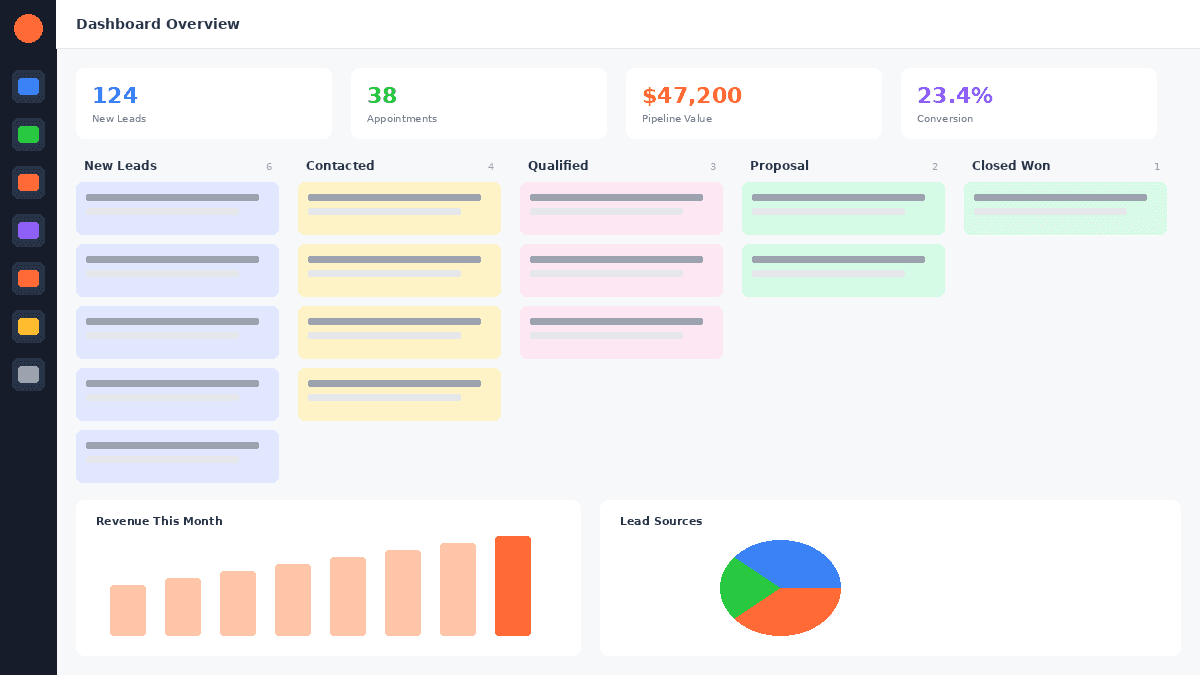
GoHighLevel uses a visual Kanban-style pipeline that mirrors how most sales teams think about deals. You create stages that represent your sales process, then drag contacts between stages as they progress.
You can create unlimited pipelines for different services, products, or client types. A marketing agency might have separate pipelines for "Website Projects," "SEO Retainers," and "Ad Management." Each pipeline has its own stages, and contacts can exist in multiple pipelines simultaneously.
Each contact in a pipeline has an "opportunity" with a monetary value. This lets you track your pipeline value at a glance - how much potential revenue sits at each stage. Weighted pipeline views apply conversion probability to each stage, giving a more realistic revenue forecast.
Pipeline stage changes trigger workflow automations. Move a contact to "Proposal Sent" and the system automatically sends the proposal email, creates a follow-up task in three days, and starts a nurture sequence. This eliminates manual follow-up entirely.
The pipeline experience is clean and intuitive. It is not as feature-rich as Salesforce's opportunity management (no custom objects, no multi-currency, no advanced forecasting), but it handles standard sales processes effectively.
Contact Management
Every person who interacts with your business becomes a contact in GoHighLevel. The contact record is the central hub for all interactions.
GoHighLevel includes standard fields (name, email, phone, address) and supports unlimited custom fields. Tags are the primary organisational tool - apply multiple tags for segmentation, automation triggers, and workflow logic. Smart Lists filter contacts dynamically based on any combination of fields, tags, dates, and activity, updating in real time.
The contact timeline logs every interaction - emails sent and received, SMS conversations, phone calls (with recordings), form submissions, page visits, appointment bookings, and pipeline movements. This gives your team complete context before every conversation.
The Unified Conversation Inbox
This is arguably GoHighLevel's most valuable CRM feature. The conversation inbox aggregates messages from every channel into a single view:
- Email - incoming and outgoing
- SMS - text message conversations
- Phone calls - call logs and recordings
- Facebook Messenger - messages from your Facebook page
- Instagram DM - direct messages from your business profile
- Google Business Messages - messages from your Google Business Profile
- WhatsApp - business messaging (where available)
- Live Chat - website chat widget messages
Instead of checking five different platforms for client communications, your team checks one inbox. For agencies managing client accounts, this is transformative. Each sub-account has its own unified inbox, so client communications stay separated.
The inbox supports assignment, so specific team members can own specific conversations. Unread message counts, channel filters, and search make it manageable even with high volume.
Reporting and Analytics
GoHighLevel's reporting covers the essentials: pipeline reports (revenue by stage, conversion rates, average time per stage), attribution reporting (lead source performance), campaign reporting (email/SMS delivery and engagement rates), and customisable dashboard widgets.
The reporting is adequate for most small and mid-size businesses. It does not match HubSpot's advanced reporting or Salesforce's custom report builder, but it covers the metrics that drive daily decisions.
CRM Comparison: GoHighLevel vs HubSpot vs Salesforce
| CRM Feature | GoHighLevel | HubSpot CRM | |
|---|---|---|---|
| Visual Pipelines | Yes | Yes | Yes |
| Unified Inbox | Yes (all channels) | Yes (email focus) | Via add-ons |
| Custom Fields | Unlimited | Limited on free, unlimited on paid | Unlimited |
| Custom Objects | No | Yes (Enterprise) | Yes |
| Workflow Automation | Yes (multi-channel) | Yes (email focus) | Yes (advanced) |
| Native SMS | Yes | Add-on | No |
| Native Phone | Yes | Add-on | No |
| Deal Forecasting | Basic (weighted) | Advanced | Advanced |
| Reporting Depth | Adequate | Good to Excellent | Excellent |
| White-Label | Yes | No | No |
| Starting Price | $97/mo | Free (limited) | $25/user/mo |
GoHighLevel's CRM is not trying to compete with Salesforce on enterprise complexity. It is designed to give agencies and service businesses a functional, integrated CRM that connects natively with marketing, communication, and sales tools - all in one platform. For a full comparison, see our GoHighLevel vs HubSpot and GoHighLevel vs Salesforce breakdowns.
Automation: Where GoHighLevel Truly Shines
The visual workflow builder is one of the most intuitive and powerful automation tools available at any price point. This is where GoHighLevel genuinely earns "best-in-class" status.
You can trigger workflows from dozens of events: form submissions, tag additions, appointment bookings, payment completions, pipeline stage changes, and more. Actions include sending emails, SMS messages, voice drops, adding tags, updating fields, creating tasks, and branching with if/else conditions.
Multi-channel sequences are easy to build. A typical agency workflow might:
- Trigger when a lead fills out a form
- Send an immediate SMS acknowledgment
- Wait 5 minutes, then send an email with more information
- If the email is opened, wait 1 day and send a follow-up
- If not opened after 3 days, send a re-engagement SMS
- If the lead books an appointment, move them to a new pipeline stage
This level of automation previously required tools like ActiveCampaign plus Zapier plus Twilio - at 3x the cost with 3x the complexity.
The speed-to-lead capability is particularly strong. The ability to send an SMS within 10 seconds of a form submission, followed by an email, a voicemail drop, and a CRM task - all within a single workflow - is genuinely powerful. No other platform at this price point matches GoHighLevel's multi-channel automation breadth.
FREE TRIAL
Get 30 Days Free With Our Partner Link
- ✓Full access for 30 days
- ✓No charge during the trial
- ✓Cancel any time
Join 2.2 million businesses already running on GoHighLevel
Common Complaints and Real Criticisms
GoHighLevel has a lot of fans. It also has frustrated users who signed up expecting an easy all-in-one platform and hit a wall during setup. Both groups have valid points.
GoHighLevel holds a 4.3/5 on G2 across 1,000+ reviews and a 4.5/5 on Capterra. Those are strong numbers for a platform this complex. But the negative reviews cluster around the same themes repeatedly.
Learning Curve (Severity: 3/5)
GoHighLevel packs in over 20 distinct features: CRM, pipelines, funnels, websites, email marketing, SMS, workflows, calendars, reputation management, membership sites, communities, reporting, and more. The navigation is not always intuitive, and the relationship between sub-accounts, snapshots, and the agency-level dashboard confuses most new users.
The workflow builder specifically generates a lot of complaints. It is powerful, but the logic around triggers, conditions, and wait steps requires a mental model that takes time to build.
This is a real issue, but it is not unique to GoHighLevel. Any platform that replaces five to eight separate tools will have a learning period. The complaints are valid - and mostly temporary. HL University (built into the platform) provides structured training, and the Facebook community has someone who has almost certainly solved your exact problem.
Budget 2-4 weeks of consistent use before GoHighLevel starts to feel natural.
Email Deliverability Requires Separate Setup (Severity: 2/5)
Out of the box, GoHighLevel does not handle email authentication for you. To send email reliably, you need to configure either Mailgun or LC Email (GoHighLevel's native email infrastructure). Either way, you need to add SPF, DKIM, and DMARC records to your domain's DNS settings.
Users who skip this step send email from an unauthenticated domain and then complain that their emails land in spam. That complaint is understandable, but it is a one-time setup task that takes 20 to 45 minutes. Once done, GoHighLevel email deliverability is on par with dedicated platforms like Mailchimp or ActiveCampaign.
Support Response Times (Severity: 2/5)
For simple questions, live chat typically resolves issues in minutes. The problems show up with complex technical issues or billing disputes that require a support engineer to investigate. Those tickets can take 24 to 72 hours for a meaningful response.
The Facebook community (100K+ members) is often faster than official support for troubleshooting workflows, integrations, and configuration issues. The support quality has also improved meaningfully over the past two years as GoHighLevel has scaled its team.
Mobile App Is Limited (Severity: 1-3/5, depending on use)
The mobile app covers CRM contacts, conversations (SMS, email, phone calls), and basic pipeline management. It does not support workflow building, funnel editing, website editing, detailed reporting, or most configuration work.
If you manage from desktop and use mobile for communication and CRM, the app is fine. If you expected a full platform experience on your phone, you will be disappointed. The app is not a replacement for the desktop experience.
Phone and SMS Requires 10DLC Registration (Severity: 2/5)
If you want to send SMS through GoHighLevel using US numbers, you need to complete A2P 10DLC registration with mobile carriers. This is a regulatory requirement for all business SMS senders in the United States, not something GoHighLevel invented. The registration process takes two to four weeks.
Start your 10DLC registration on day one of your trial. Do not wait until you are ready to launch a campaign.
Can Be Overwhelming for Simple Use Cases (Severity: 3/5 for the wrong user)
If you are a solopreneur who needs email marketing, a basic CRM, or a simple scheduling tool, GoHighLevel at $97 per month is overkill - in price and in cognitive load. Platforms like Mailchimp, ConvertKit, or HubSpot Starter exist specifically for simpler use cases and are better fits.
This is not a platform flaw. It is a positioning issue. GoHighLevel is built for agencies running multiple clients, businesses managing multiple marketing channels simultaneously, and operators who want to replace their entire marketing stack with one tool. If that is not your situation, the learning curve delivers minimal return.
Feature-by-Feature Ratings
| Feature | Category | Rating |
|---|---|---|
| CRM & Contacts | 4/5 | Strong for bundled tool |
| Funnel Builder | 4/5 | Good templates, decent editor |
| Email Marketing | 3.5/5 | Functional, needs proper setup |
| Automation | 5/5 | Best-in-class for the price |
| White-Label | 5/5 | Unmatched in the market |
| Ease of Use | 3/5 | Steep learning curve |
| Value for Money | 5/5 | Exceptional ROI |
Who Should Use GoHighLevel
Not sure which plan fits your needs? Take the Plan Finder quiz → or use the Stack Savings Calculator → to see how much you'd save by consolidating. You can also estimate your ROI → based on your current setup.
Marketing agencies managing 3+ clients - the unlimited sub-accounts and white-labelling make it a clear choice. Each client gets an isolated environment, and you manage everything from one dashboard.
Service businesses with multiple marketing channels - if your business uses email, SMS, phone, and appointment booking, GoHighLevel consolidates all of it. Local businesses, consultants, and professional services benefit significantly.
Businesses currently paying for 3+ separate tools - if your monthly tool spend exceeds $200 across CRM, email, funnels, and scheduling, consolidating to GoHighLevel saves money and time immediately.
SaaS builders who want to launch a software product without coding or infrastructure. GoHighLevel's SaaS mode lets you create a recurring revenue business on top of GHL's platform.
Who Should NOT Use GoHighLevel
Enterprise companies needing deeply custom CRM with complex reporting, custom objects, and multi-dimensional forecasting. Salesforce or HubSpot Enterprise are better choices.
E-commerce businesses that need advanced inventory and shipping management. GoHighLevel has order forms and checkout functionality, but no inventory tracking, product variant management, or deep e-commerce reporting. Shopify or WooCommerce are better choices.
Solopreneurs who only need one tool - if you just need email marketing or a basic CRM, a dedicated platform at $20-$50 per month is more cost-effective. GoHighLevel's learning curve delivers minimal return if you are not using multiple features.
Non-technical users who dislike learning new tools - if you are not willing to invest 2-4 weeks (or hire someone to set it up), the investment may not pay off.
Frequently Asked Questions
Is GoHighLevel worth it?
Is GoHighLevel good for beginners?
How does GoHighLevel compare to ClickFunnels?
Can GoHighLevel replace HubSpot?
Is GoHighLevel's email marketing good?
What are the biggest GoHighLevel complaints?
Is GoHighLevel reliable?
Does GoHighLevel have a mobile app?
How often does GoHighLevel add new features?
Can I migrate from another platform to GoHighLevel?
For a full plan comparison, see GoHighLevel pricing plans.
For a head-to-head breakdown, see our GoHighLevel vs ClickFunnels comparison.
For a deep-dive into GHL's AI capabilities, see our complete GoHighLevel AI guide. For AI pricing specifics, our AI Employee plan breakdown covers exactly what's included in the $97/month unlimited option.
You can try GoHighLevel free for 30 days to see if it lives up to the review.
EXTENDED FREE TRIAL
Start with 30 days free, not 14.
Use our partner link to get double the standard 14-day trial.
Start Your Free 30-Day Trial →Digital entrepreneur and hands-on GoHighLevel user writing from real-world experience.
Was this article helpful?